<?xml version="1.0" encoding="utf-8"?>
<feed xmlns="http://www.w3.org/2005/Atom">

  <title><![CDATA[Doing things the hard way...]]></title>
  <link href="http://blog.diogot.com/atom.xml" rel="self"/>
  <link href="http://blog.diogot.com/"/>
  <updated>2014-11-25T23:40:37-02:00</updated>
  <id>http://blog.diogot.com/</id>
  <author>
    <name><![CDATA[Diogo Tridapalli]]></name>
    
  </author>
  <generator uri="http://octopress.org/">Octopress</generator>

  
  <entry>
    <title type="html"><![CDATA[Swift Embedded Runtime Library Increases App Size]]></title>
    <link href="http://blog.diogot.com/blog/2014/09/29/swift-embedded-runtime-library-increases-app-size/"/>
    <updated>2014-09-29T23:44:55-03:00</updated>
    <id>http://blog.diogot.com/blog/2014/09/29/swift-embedded-runtime-library-increases-app-size</id>
    <content type="html"><![CDATA[<p>Since beginning Swift attracted a lot of attention, one of many questions was: How Apple will guarantee backwards compatibility in future Swift releases?</p>

<p>The response is cited a few times at Swift Blog, like the <a href="https://developer.apple.com/swift/blog/?id=14">post of 1.0 release</a>:</p>

<blockquote><p>Because your apps today embed a version of the Swift GM runtime, they will continue to run well into the future.</p></blockquote>

<p>But one thing, so far, I don&rsquo;t see people talking about is how this embedded library affect the size of an app?</p>

<!-- more -->


<p>The easiest way to discover is to create an empty project and compare the size.
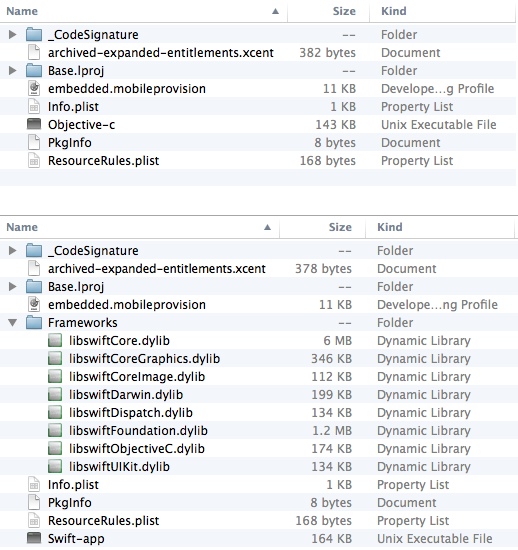
I created two <em>Single View Application</em> projects using on Xcode 6.0.1. On the first image is the bundle directory of Objective-C app and on the second the Swift one.</p>

<p><img class="center" src="http://blog.diogot.com/images/swift-lib-overhead.jpg" width="518" height="338" title="'App bundle files and sizes'" ></p>

<p>The Objective-C only app bundle takes only 192 KB and the Swift app bundle 8.6 MB. The Swift binary is smaller but the runtime frameworks can be a huge overhead for many apps!</p>

<p>On the second post of Swift Blog talk about <a href="https://developer.apple.com/swift/blog/?id=2">Compatibility</a>:</p>

<blockquote><p>As Swift changes, those frameworks will be incompatible with the rest of your app. When the binary interface stabilizes in a year or two, the Swift runtime will become part of the host OS and this limitation will no longer exist.</p></blockquote>

<p>So for at least one year if you want to use Swift in your apps, you will have to accept this <em>little</em> overhead.</p>

<hr />

<p><em>Update 2014/09/30</em>: Worth to mention that the runtime libraries are embedded on every app that supports Swift, no matter the minimum deployment target.</p>
]]></content>
  </entry>
  
  <entry>
    <title type="html"><![CDATA[Swift, Access Control and Testing]]></title>
    <link href="http://blog.diogot.com/blog/2014/08/23/swift_access_control_and_testing/"/>
    <updated>2014-08-23T22:04:31-03:00</updated>
    <id>http://blog.diogot.com/blog/2014/08/23/swift_access_control_and_testing</id>
    <content type="html"><![CDATA[<p>Access control in Swift looks nice, but can give some trouble to find out how to make tests work smoothly. (The code in this post works with Xcode 6 beta 6.)</p>

<!-- more -->


<p>There are three <a href="https://developer.apple.com/library/prerelease/ios/documentation/Swift/Conceptual/Swift_Programming_Language/Inheritance.html#//apple_ref/doc/uid/TP40014097-CH17-XID_251">Access Control</a> levels:</p>

<ul>
<li><em>Public access</em> enables entities to be used within any source file from their defining module, and also in a source file from another module that imports the defining module. You typically use public access when specifying the public interface to a framework.</li>
<li><em>Internal access</em> enables entities to be used within any source file from their defining module, but not in any source file outside of that module. You typically use internal access when defining an app’s or a framework’s internal structure.</li>
<li><em>Private access</em> restricts the use of an entity to its own defining source file. Use private access to hide the implementation details of a specific piece of functionality.”</li>
</ul>


<p>The default level is <em>Internal access</em>, this is fine, all your classes are visible only to your module, no imports, no external access. Although soon on later you will test your code, right?</p>

<p>First of all, XCTestCase are bundled on a different target and you don&rsquo;t include your classes to the test bundle, right? That&rsquo;s easy, just import the target that contains your class, if your target is called <code>MyProject</code> your test class will be like this:</p>

<figure class='code'><div class="highlight"><table><tr><td class="gutter"><pre class="line-numbers"><span class='line-number'>1</span>
<span class='line-number'>2</span>
<span class='line-number'>3</span>
<span class='line-number'>4</span>
<span class='line-number'>5</span>
<span class='line-number'>6</span>
<span class='line-number'>7</span>
<span class='line-number'>8</span>
<span class='line-number'>9</span>
</pre></td><td class='code'><pre><code class=''><span class='line'>import UIKit
</span><span class='line'>import XCText
</span><span class='line'>import MyProject
</span><span class='line'>
</span><span class='line'>class MyProjectTests: XCTestCase {
</span><span class='line'>    func testMyProject() {
</span><span class='line'>        XCTAssert(true, "Pass")
</span><span class='line'>    }
</span><span class='line'>}</span></code></pre></td></tr></table></div></figure>


<p>But this is not enough, do you remember that the default access level is <code>Inernal</code>? If you don&rsquo;t change it in the class that will be tested the compiler will say something like: <code>Use of unresolved identifier 'MyClass'</code>. To void this just set your class and all the methods and properties that will be tested to <code>public</code>:</p>

<figure class='code'><div class="highlight"><table><tr><td class="gutter"><pre class="line-numbers"><span class='line-number'>1</span>
<span class='line-number'>2</span>
<span class='line-number'>3</span>
<span class='line-number'>4</span>
</pre></td><td class='code'><pre><code class=''><span class='line'>public class MyClass: NSObject {
</span><span class='line'>    public var prop: String
</span><span class='line'>    public init() {}
</span><span class='line'>}</span></code></pre></td></tr></table></div></figure>

]]></content>
  </entry>
  
  <entry>
    <title type="html"><![CDATA[Counting the Number of Midnights Between Two Dates]]></title>
    <link href="http://blog.diogot.com/blog/2013/10/02/counting-the-number-of-midnights-between-two-dates/"/>
    <updated>2013-10-02T00:09:00-03:00</updated>
    <id>http://blog.diogot.com/blog/2013/10/02/counting-the-number-of-midnights-between-two-dates</id>
    <content type="html"><![CDATA[<p>Math with dates is always tricky, calculate the number of midnights between two days is not an exception.
Here I have extended the example from the <a href="https://developer.apple.com/library/ios/documentation/cocoa/Conceptual/DatesAndTimes/Articles/dtCalendricalCalculations.html#//apple_ref/doc/uid/TP40007836-SW8">Apple documentation</a> to avoid <code>nil</code> dates.</p>

<!-- more -->


<figure class='code'><figcaption><span></span></figcaption><div class="highlight"><table><tr><td class="gutter"><pre class="line-numbers"><span class='line-number'>1</span>
<span class='line-number'>2</span>
<span class='line-number'>3</span>
<span class='line-number'>4</span>
<span class='line-number'>5</span>
<span class='line-number'>6</span>
<span class='line-number'>7</span>
<span class='line-number'>8</span>
<span class='line-number'>9</span>
<span class='line-number'>10</span>
<span class='line-number'>11</span>
<span class='line-number'>12</span>
<span class='line-number'>13</span>
<span class='line-number'>14</span>
<span class='line-number'>15</span>
<span class='line-number'>16</span>
<span class='line-number'>17</span>
<span class='line-number'>18</span>
<span class='line-number'>19</span>
<span class='line-number'>20</span>
<span class='line-number'>21</span>
<span class='line-number'>22</span>
<span class='line-number'>23</span>
<span class='line-number'>24</span>
<span class='line-number'>25</span>
</pre></td><td class='code'><pre><code class='objc'><span class='line'><span class="k">-</span> <span class="p">(</span><span class="n">NSInteger</span><span class="p">)</span><span class="nf">midnightsBetweenFromDate:</span><span class="p">(</span><span class="n">NSDate</span> <span class="o">*</span><span class="p">)</span><span class="nv">startDate</span>
</span><span class='line'>                               <span class="nf">toDate:</span><span class="p">(</span><span class="n">NSDate</span> <span class="o">*</span><span class="p">)</span><span class="nv">endDate</span>
</span><span class='line'><span class="p">{</span>
</span><span class='line'>    <span class="k">if</span> <span class="p">(</span><span class="n">startDate</span> <span class="o">==</span> <span class="nb">nil</span> <span class="o">||</span> <span class="n">endDate</span> <span class="o">==</span> <span class="nb">nil</span><span class="p">)</span>
</span><span class='line'>        <span class="k">return</span> <span class="n">NSNotFound</span><span class="p">;</span>
</span><span class='line'>
</span><span class='line'>    <span class="n">NSCalendar</span> <span class="o">*</span><span class="n">calendar</span> <span class="o">=</span> <span class="p">[[</span><span class="n">NSCalendar</span> <span class="n">alloc</span><span class="p">]</span> <span class="nl">initWithCalendarIdentifier:</span><span class="n">NSGregorianCalendar</span><span class="p">];</span>
</span><span class='line'>
</span><span class='line'>    <span class="n">NSInteger</span> <span class="n">startDay</span> <span class="o">=</span> <span class="p">[</span><span class="n">calendar</span> <span class="nl">ordinalityOfUnit:</span><span class="n">NSDayCalendarUnit</span>
</span><span class='line'>                                             <span class="nl">inUnit:</span><span class="n">NSEraCalendarUnit</span>
</span><span class='line'>                                            <span class="nl">forDate:</span><span class="n">startDate</span><span class="p">];</span>
</span><span class='line'>
</span><span class='line'>    <span class="n">NSInteger</span> <span class="n">endDay</span> <span class="o">=</span> <span class="p">[</span><span class="n">calendar</span> <span class="nl">ordinalityOfUnit:</span><span class="n">NSDayCalendarUnit</span>
</span><span class='line'>                                           <span class="nl">inUnit:</span><span class="n">NSEraCalendarUnit</span>
</span><span class='line'>                                          <span class="nl">forDate:</span><span class="n">endDate</span><span class="p">];</span>
</span><span class='line'>    <span class="p">[</span><span class="n">calendar</span> <span class="n">release</span><span class="p">];</span>
</span><span class='line'>
</span><span class='line'>    <span class="k">if</span> <span class="p">(</span><span class="n">startDay</span> <span class="o">==</span> <span class="n">NSNotFound</span><span class="p">)</span>
</span><span class='line'>        <span class="k">return</span> <span class="n">startDay</span><span class="p">;</span>
</span><span class='line'>
</span><span class='line'>    <span class="k">if</span> <span class="p">(</span><span class="n">endDay</span> <span class="o">==</span> <span class="n">NSNotFound</span><span class="p">)</span>
</span><span class='line'>        <span class="k">return</span> <span class="n">endDay</span><span class="p">;</span>
</span><span class='line'>
</span><span class='line'>    <span class="k">return</span> <span class="n">endDay</span> <span class="o">-</span> <span class="n">startDay</span><span class="p">;</span>
</span><span class='line'><span class="p">}</span>
</span></code></pre></td></tr></table></div></figure>

]]></content>
  </entry>
  
  <entry>
    <title type="html"><![CDATA[Static Libs With Support to iOS 5 and Arm64]]></title>
    <link href="http://blog.diogot.com/blog/2013/09/18/static-libs-with-support-to-ios-5-and-arm64/"/>
    <updated>2013-09-18T12:36:00-03:00</updated>
    <id>http://blog.diogot.com/blog/2013/09/18/static-libs-with-support-to-ios-5-and-arm64</id>
    <content type="html"><![CDATA[<p>With the launch of iPhone 5s Apple brings the 64-bit architecture to mobile, this brings new possibilities for the iOS platform. But there is a restriction imposed by Apple, only projects with deployment target to iOS 6.0 or higher can produce fat binaries including arm64. So the apps developer should choose between support iOS 5 and earlier or arm64, although SDK developers shouldn&rsquo;t be obligated to decide for your users! It&rsquo;s possible to produce one fat binary with all the architectures, so let&rsquo;s see one way to do it.</p>

<!-- more -->


<p>There is a <a href="https://devforums.apple.com/message/887883#887883">discussion</a> on Developer Forums where an Apple developer explains that this restriction is due to iOS 5 are not prepared to handle the fat binary headers that contain 64-bit code. Although static libraries aren&rsquo;t handled by iOS but by the linker that came with Xcode and Xcode 5 linker obviously can handle 64-bit code!</p>

<p>The idea is pretty simple, build the different architectures separated then bind them using <a href="https://developer.apple.com/library/mac/documentation/Darwin/Reference/ManPages/man1/lipo.1.html">lipo</a>.
I know that is possible to do this using directly the Xcode, but I prefer to do it via command line (or Rakefile).</p>

<p>First build the binary with <code>arm</code> using <code>xcodebuild</code>:</p>

<figure class='code'><figcaption><span>Build arm</span></figcaption><div class="highlight"><table><tr><td class="gutter"><pre class="line-numbers"><span class='line-number'>1</span>
</pre></td><td class='code'><pre><code class='bash'><span class='line'>xcodebuild -project <span class="s1">&#39;StaticLibDemo.xcodeproj&#39;</span> -configuration <span class="s1">&#39;Release&#39;</span> -sdk <span class="s1">&#39;iphoneos7.0&#39;</span> clean build <span class="nv">ARCHS</span><span class="o">=</span><span class="s1">&#39;armv7 armv7s&#39;</span> <span class="nv">IPHONEOS_DEPLOYMENT_TARGET</span><span class="o">=</span><span class="s1">&#39;5.0&#39;</span> <span class="nv">TARGET_BUILD_DIR</span><span class="o">=</span><span class="s1">&#39;./build-arm&#39;</span> <span class="nv">BUILT_PRODUCTS_DIR</span><span class="o">=</span><span class="s1">&#39;./build-arm&#39;</span>
</span></code></pre></td></tr></table></div></figure>


<p>Note that you must set <code>IPHONEOS_DEPLOYMENT_TARGET='5.0'</code> and <code>ARCHS='armv7 armv7s'</code>, it&rsquo;s recommended to set build and product dirs to make the things more clear, take a look at <a href="https://developer.apple.com/library/ios/documentation/DeveloperTools/Reference/XcodeBuildSettingRef/1-Build_Setting_Reference/build_setting_ref.html">Build Setting Reference</a> for more details what this flags means.</p>

<p>Next build for <code>arm64</code>:</p>

<figure class='code'><figcaption><span>Build arm64</span></figcaption><div class="highlight"><table><tr><td class="gutter"><pre class="line-numbers"><span class='line-number'>1</span>
</pre></td><td class='code'><pre><code class='bash'><span class='line'>xcodebuild -project <span class="s1">&#39;StaticLibDemo.xcodeproj&#39;</span> -configuration <span class="s1">&#39;Release&#39;</span> -sdk <span class="s1">&#39;iphoneos7.0&#39;</span> clean build <span class="nv">ARCHS</span><span class="o">=</span><span class="s1">&#39;arm64&#39;</span> <span class="nv">IPHONEOS_DEPLOYMENT_TARGET</span><span class="o">=</span><span class="s1">&#39;7.0&#39;</span> <span class="nv">TARGET_BUILD_DIR</span><span class="o">=</span><span class="s1">&#39;./build-arm64&#39;</span> <span class="nv">BUILT_PRODUCTS_DIR</span><span class="o">=</span><span class="s1">&#39;./build-arm64&#39;</span>
</span></code></pre></td></tr></table></div></figure>


<p>Note the difference on <code>ARCHS</code> and <code>IPHONEOS_DEPLOYMENT_TARGET</code>. We also need to build for simulator, in this case we have to change the sdk to <code>iphonesimulator7.0</code> and build in two steps first for <code>i386</code>:</p>

<figure class='code'><figcaption><span>Build i386</span></figcaption><div class="highlight"><table><tr><td class="gutter"><pre class="line-numbers"><span class='line-number'>1</span>
</pre></td><td class='code'><pre><code class='bash'><span class='line'>xcodebuild -project <span class="s1">&#39;StaticLibDemo.xcodeproj&#39;</span> -configuration <span class="s1">&#39;Release&#39;</span> -sdk <span class="s1">&#39;iphonesimulator7.0&#39;</span> clean build <span class="nv">ARCHS</span><span class="o">=</span><span class="s1">&#39;i386&#39;</span> <span class="nv">IPHONEOS_DEPLOYMENT_TARGET</span><span class="o">=</span><span class="s1">&#39;5.0&#39;</span> <span class="nv">TARGET_BUILD_DIR</span><span class="o">=</span><span class="s1">&#39;./build-i386&#39;</span> <span class="nv">BUILT_PRODUCTS_DIR</span><span class="o">=</span><span class="s1">&#39;./build-i386&#39;</span>
</span></code></pre></td></tr></table></div></figure>


<p>Now the tricky part! If you just change the <code>ARCHS</code> to <code>x86_86</code> depending on your Xcode setting you will got an error like: &ldquo;x86_64 is not a valid arch&rdquo;. To avoid this just add <code>VALID_ARCHS='x86_64'</code>:</p>

<figure class='code'><figcaption><span>Build x86_64</span></figcaption><div class="highlight"><table><tr><td class="gutter"><pre class="line-numbers"><span class='line-number'>1</span>
</pre></td><td class='code'><pre><code class='bash'><span class='line'>xcodebuild -project <span class="s1">&#39;StaticLibDemo.xcodeproj&#39;</span> -configuration <span class="s1">&#39;Release&#39;</span> -sdk <span class="s1">&#39;iphonesimulator7.0&#39;</span> clean build <span class="nv">ARCHS</span><span class="o">=</span><span class="s1">&#39;x86_64&#39;</span> <span class="nv">VALID_ARCHS</span><span class="o">=</span><span class="s1">&#39;x86_64&#39;</span> <span class="nv">IPHONEOS_DEPLOYMENT_TARGET</span><span class="o">=</span><span class="s1">&#39;7.0&#39;</span> <span class="nv">TARGET_BUILD_DIR</span><span class="o">=</span><span class="s1">&#39;./build-x86_64&#39;</span> <span class="nv">BUILT_PRODUCTS_DIR</span><span class="o">=</span><span class="s1">&#39;./build-x86_64&#39;</span>
</span></code></pre></td></tr></table></div></figure>


<p>Finally we just have to create a fat binary with all the 5 architectures:</p>

<figure class='code'><figcaption><span>Lipo</span></figcaption><div class="highlight"><table><tr><td class="gutter"><pre class="line-numbers"><span class='line-number'>1</span>
</pre></td><td class='code'><pre><code class='bash'><span class='line'>lipo -create <span class="s1">&#39;./build-arm/libStaticLibDemo.a&#39;</span> <span class="s1">&#39;./build-arm64/libStaticLibDemo.a&#39;</span> <span class="s1">&#39;./build-i386/libStaticLibDemo.a&#39;</span> <span class="s1">&#39;./build-x86_64/libStaticLibDemo.a&#39;</span> -output <span class="s1">&#39;libStaticLibDemo.a&#39;</span>
</span></code></pre></td></tr></table></div></figure>


<p>I created a working example of this, you can get it <a href="https://github.com/diogot/StaticLibDemo">here</a>.</p>
]]></content>
  </entry>
  
</feed>